


Product Comparisons
Workforce intelligence for remote, hybrid, and in-office teams
Maximize productivity, optimize how work gets done, reduce business spend, prevent data loss and ensure AI oversight
- Monitor AI usage to support governance and policy compliance
- Filter the web and stop data loss across every endpoint, in real time
- Get a clear picture of activity across every device and location, no guessing
*No credit card required · Deploy in minutes · Cloud or on-premise
700+ organizations trust CurrentWare's employee monitoring software for visibility & control
Complete AI Governance for the Workplace
Discover shadow AI, measure AI adoption, protect sensitive data, enforce policy, and stay audit-ready – all from one platform.
CurrentWare helps you answer the questions that matter:
- Are employees using unapproved AI tools?
- Is AI adoption on track – and are our AI investments paying off?
- Which AI licenses are delivering value, and which should we reclaim?
- Where should we invest in AI next?
- What work should we automate next?
- Are we compliant, secure, and audit-ready?
How CurrentWare Helps Answer These Questions
See exactly how CurrentWare helps you find, measure, and control AI use across your organization.
Discover shadow AI
Find every AI tool being used by your employees, including the ones they didn’t submit for approval. You can’t write an AI policy for tools you can’t see.
Measure AI adoption and license ROI
See which teams actually use the AI seats you’re paying for, and which licenses to reclaim at renewal. Same usage data that drives software license optimization.
Track AI activity by keyword
AI-assisted OCR reads the text inside captured screenshots, so an investigation becomes a keyword search, not opening images one at a time.
Enforce your AI acceptable use policy
Allow the tools you’ve approved and block the rest by user, group, department, or schedule. Different teams can follow different rules based on their needs.
Keep sensitive data out of AI tools
Pair BrowseControl web filtering with AccessPatrol device control so confidential files and records don’t reach unapproved AI platforms in the first place.
Stay AI audit-ready
Keep timestamped records of AI tool access, web activity, and file transfers. Give compliance, legal, and security teams the evidence they need.
Everything You Need in One Console
CurrentWare is a workforce analytics software that brings four modules onto one platform. Deploy just one, or all of them together as the CurrentWare Suite.

Complete Workforce Intelligence Solution
All four modules- productivity analytics, web filtering, device control, and power management- in one integrated console. Mix and match, or run the full suite.

Employee Activity & Productivity Tracking
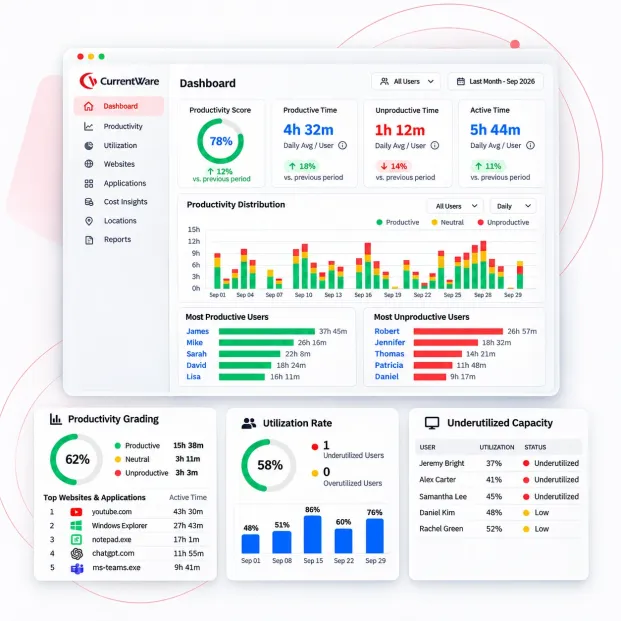
See exactly which apps and websites your team uses and where their time actually goes, across every location, every day.
Web Filtering & Internet Management
Block distracting or harmful websites and set internet usage rules for office, remote, and hybrid workers.
Data Loss Prevention & Device Control
Prevent sensitive files from leaving the company through USB drives or unauthorized file transfers.
From Work Visibility to Business Intelligence
Real-time visibility into productivity, security and workforce activity, without the guesswork.
Full-Picture Visibility
Track how work actually happens across apps, devices, AI tools and daily workflows, instead of relying on fragmented views from a single platform.
AI usage & governance
Easily track & monitor who is using which AI tools, and enforce your AI acceptable use policy by group.
Insight-Driven Intelligence
Turn raw activity data into clear recommendations, trends and comparisons your team can act on to improve performance and productivity.
Smart Access Control
Decide where your teams spend time by blocking distracting, unproductive or risky sites and apps, no matter where or how your team works.
Controlled Device Access
Ensure your data is discrete and by controlling which external drives can connect, and keep a clear record of every file transfer.
Data-Leak Prevention
Spot risky uploads to personal cloud storage in real time before sensitive data walks out the door.
CurrentWare’s New Work Intelligence Features
Recently shipped capabilities that give you deeper visibility and faster, simpler deployment.
OCR keyword search New
CurrentWare can now read the text inside captured screenshots. Search through screen activity using keywords instead of opening images one by one.
Cloud deployment New
No server to set up or maintain. Get CurrentWare running in minutes and manage everything from your browser, from anywhere.
AI usage trackingNew
See which AI tools like ChatGPT or Copilot your team is using, how often, and whether any company data might be at risk.
Measurable impact where it matters
48%
less software spend by reclaiming unused and redundant licenses.
$81K
Increase in productivity after putting activity insights to work.
100%
Compliance confidence with audit-ready reporting and policy enforcement.
Turn Daily Activity Into Actionable Insights
CurrentWare takes what happens on your company’s computers every day and turns it into information leaders can actually use.
Lower software spend
Find unused tools and trim your IT budget. Customers save up to 48%
Higher productivity
Reduce distractions and idle time. Some teams report up to 81% productivity gains.
Audit-ready compliance
Keep records and policies that line up with HIPAA, NIST, ISO 27001, CMMC, and more.
Fewer data incidents
Block risky file transfers and USB activity before data walks out the door.
Faster investigations
Give HR and security teams real, objective evidence when they need it.
Proven ROI
Make smarter spending decisions backed by actual usage data.
3 Things Currentware Does Really Well- Productivity, Protection & Cost Control
Productivity Intelligence
- Measure app and website usage
- Detect time-wasting patterns
- Optimize workflows with real data
Insider Threat Protection
- Prevent USB data leaks with AccessPatrol
- Block risky cloud and email transfers
- Stop shadow IT and reduce attack surface
Cost Optimization
- Identify unused software licenses
- Right-size IT budgets at renewal
- Reduce SaaS sprawl
5 Reasons Why Teams Pick CurrentWare Over the Alternatives
Choosing a workforce analytics tool means weighing trade-offs: cloud vs. on-prem, one feature vs. all of them, entry pricing vs. what you actually end up paying.
Your data can stay on your servers
Deploy on-premise, self-managed, or in our cloud. With CurrentWare, monitoring data never has to leave your network, which is why government, defense, healthcare, and utility teams shortlist us.
The gap: most competitors are cloud-only, which rules them out before the evaluation even starts.
Four capabilities, one agent, one console
Be it productivity analytics, web and app filtering, USB device control with DLP, or PC power management, you get four all in one console.
The gap: analytics-only vendors send you elsewhere to buy filtering and device control.
Transparent monitoring, not covert surveillance
Choose exactly what you collect, switch off what you don’t need, and tell employees what’s monitored. CurrentWare ensures your program survives scrutiny from works councils, unions, and privacy regulators.
The gap: tools marketed on stealth create a rollout problem you inherit later.
Compliance evidence, not just dashboards
Controls and reports that map to HIPAA, NIST 800-171, CMMC, ISO 27001, NERC CIP, and CIPA, so an audit request becomes a report you run, not a project you staff.
The gap: productivity-first tools leave you assembling audit evidence by hand.
One price, every feature, 20+ years behind it
From approximately $12 per user per month in USD, CAD, and GBP, with volume discounts. The 14-day trial includes every feature, nothing held back for an enterprise tier.
The gap: tiered pricing that puts DLP, alerts, or on-prem behind a sales call.
Why CurrentWare Outperforms Other Work Intelligence Platforms
Trusted where risk is highest. Proven where it matters most. For over 20 years, CurrentWare has helped organizations move beyond basic monitoring to true workforce intelligence, control, and compliance.
| Feature | CurrentWare | Other Solutions |
|---|---|---|
| AI Tool Usage Visibility | ✅ Yes – BrowseReporter | Rarely included |
| AI Policy Enforcement (allow / block by group) | ✅ Yes – BrowseControl | No |
| Deployment Choice (on-prem, self-managed, cloud) | ✅ All three | Cloud only |
| Productivity Insights & Analytics | ✅ Yes – BrowseReporter | Limited |
| Data Loss Prevention (DLP) | ✅ Yes – AccessPatrol | Rarely included |
| Web Filtering & App Control | ✅ Yes – BrowseControl | Separate tool required |
| Insider Threat Detection | ✅ Yes | Limited |
| Compliance Reporting (HIPAA, NIST, SOC 2) | ✅ Yes | Limited |
| On-Premise Deployment Option | ✅ Yes | Rarely available |
| Software License Optimization | ✅ Yes | No |
See How CurrentWare Compares with Other Tools
Side-by-side comparisons with the monitoring, web filtering and device control tools buyers shortlist most. Each page covers features, deployment and pricing, including where another tool may suit you better.
- Product Comparisons
Zscaler Alternative
- Product Comparisons
WebTitan Alternatives
- Product Comparisons
Veriato Alternatives
- Product Comparisons
Teramind Alternatives
- Product Comparisons
SafeConsole Alternative
- Product Comparisons
ManageEngine Alternative
- Product Comparisons
InterGuard Alternative
Built for the Teams That Run Modern Workplaces
Different teams, one platform; each gets the visibility and control they need without extra tools.
IT & Security Teams
Enforce policies and catch risky activity across every device.
HR & People Ops
Use real activity data for fair reviews and workplace investigations.
Compliance & Legal
Produce audit trails and show regulators you’re doing things right.
Finance & IT Cost Owners
Cut software waste and make smarter renewal decisions.
Operations & Team Leads
Find workflow bottlenecks and help your team focus.
Managed Service Providers
Oversee productivity, filtering, and data protection for multiple clients from one place.
Solutions That Work Across Industries
Tailored controls that help you meet industry standards, boost efficiency, and protect sensitive data across remote and in-office teams.
Healthcare
HIPAA-ready controls to protect PHI with USB management and insider-threat visibility.
Government
Cybersecurity and policy enforcement aligned to NIST 800-171 and CMMC.
Legal Services
Keep client data protected, billable hours productive, and software costs in check.
Manufacturing
Productivity monitoring and internet visibility for both the shop floor and back office.
Financial Services
Enforce access policies and protect sensitive financial data with audit-ready trails.
Schools & Libraries
CIPA-compliant web filtering to qualify for E-Rate and keep students safe online.
Small Business Employee Productivity
Track unproductive web browsing and idle time to detect time-wasting
Managed Service Providers
Deliver the monitoring, data-loss prevention, and web filtering your clients need, now with faster deployment, and easier management.
Who Needs Workforce Intelligence & Control?
Tailored controls that help you meet industry standards, boost efficiency, and protect sensitive data across remote and in-office teams.
Remote & Hybrid Teams
Keep visibility and policy consistent whether staff is in-office, at home, or on the move.
Medium to Large Enterprises
Manage complex environments and enforce security policy across thousands of computers.
Businesses
Set up basic security and productivity tools quickly, without a big IT team.
Government & Public Sector
Meet strict cybersecurity mandates with on-premise control options.
Healthcare & Regulated Industries
Protect sensitive data and maintain HIPAA, NIST, and CMMC conscious controls.
Schools & Libraries
Filter content and meet CIPA requirements to qualify for E-Rate funding.
Built to Support Your Compliance Program
Discover how organizations use CurrentWare’s employee monitoring software to improve visibility, strengthen compliance efforts, and manage employee activity more effectively.
- CMMC Compliance →

CMMC
Endpoint Restriction to Protect CUI & FCI
- NIST 800-171 Compliance →

NIST 800-171/53
Protect Controlled Unclassified Information
- ISO 27001 Compliance →

ISO 27001
Increase the Maturity of Your ISO27K ISMS
- HIPAA Compliance →

HIPAA
HIPAA protects sensitive patient data
- Cyber Essentials Compliance →

Cyber Essentials
Critical Security Controls For Your Assessment
- GDPR Compliance →

GDPR
EU’s data protection and privacy law
- NERC CIP Compliance →

NERC CIP
Protect TCAs & BCSI From Insider Threats
- CIPA Compliance for Education →

CIPA for Education
Qualify for the FCC’s E-Rate Program
Pick & Plug Into Your Existing Stack
CurrentWare works alongside the identity, security, and directory tools you already use, including support for SAML, OIDC, and CEF standards. Cloud connectors are on the way.
- Tested & supported
- Generic standards (SAML, OIDC, CEF)
- On the roadmap (Cloud)


How Customers Use Currentware
Discover how organizations use CurrentWare to improve visibility, strengthen compliance efforts, and manage employee activity more effectively.
-
 Healthcare
From Hunch to Hard Evidence: How CurrentWare Informs HR Investigations
Read case study → - IT & Operations
Web filtering without manual policing: acceptable use enforced by category at scale
Read case study → - Education
Local College Keeps Its Students and Systems Safe From Internet-Based Threats
Read case study →
Trusted by teams across the United States, Canada & the United Kingdom
Join 100,000+ professionals across 55 countries.


What customers say about CurrentWare
4.8 / 5
Across the whole CurrentWare Suite.
4.7 / 5
90% of reviewers would recommend BrowseReporter (average likelihood to recommend: 9 out of 10).
4.7 / 5
90% of reviewers would recommend BrowseControl (average likelihood to recommend: 9 out of 10).
4.9 / 5
90% of reviewers would recommend AccessPatrol (average likelihood to recommend: 9 out of 10).
Featured resources
Helpful guides, templates, checklists, and planning resources to support your monitoring strategy and rollout.
-

Workplace Monitoring Policy Template
Download → -

Work From Home Policy Template
Download → -

Get Your Free Social Media Policy Template
Download → -
How to Create a Privacy-First Employee Monitoring Strategy
Download → -

Download the Removable Media Policy Template
Download → -

Internet Acceptable Use Policy Template
Download → -
How to Keep Data Safe When Offboarding Employees
Download → -

Get Your Free Performance Improvement Plan Template
Download → -
Employee offboarding checklist for it admins
Download → -

Download Your Free Employee Monitoring Template
Download → -
Get Your Free Employee Monitoring Starter Kit
Download → -

Employee Attendance Policy Template
Download →
Webinars
Session library
Live and on-demand sessions. On-demand recordings open straight away.
- Live · Nov 18, 2026
Give Your Clients More. Manage Them With Less.
A practical walkthrough of the CurrentWare features your clients are asking for, including PII protection and application allowlisting, plus a first look at our new MSP console.
- On demand
Productivity & ROI
Customer Success Story
Sentry View Systems on the reports they actually use: productivity patterns, blocked high-risk sites, and the cost figures that won leadership over.
- On demand
AI governance
The AI Blind Spot: How to Find Shadow AI, Enforce Policy, and Measure AI Adoption
Employees are already using ChatGPT, Copilot, Gemini, and Claude, with or without approval. See how to find those tools, keep company data out of them, and tell real adoption from noise.
- On demand
Cloud & platform
Cloud Suite Live Demo
A live console tour: a cloud server spun up in real time, OCR-enhanced screenshot reporting, and the migration answers on-premises customers asked for.

Stop confidential data from leaking into AI tools
Set clear rules on AI tools, confidential data, and approved use with a free, customizable policy template.
Knowledge Base
The CurrentWare Knowledge Base
Everything you need to get set up, stay running, and fix issues fast.
-
System Requirements (opens the Help Center in a new tab)
CurrentWare is compatible with a wide range of Windows computers, supporting both 32-bit and 64-bit systems. The Web Console adds flexibility by allowing you to access and manage administrative settings…
-
Install CurrentWare on private cloud platforms (opens the Help Center in a new tab)
Introduction Expand your CurrentWare setup beyond your office and start running CurrentWare on your own private cloud servers. The CurrentWare Server and Clients are fully compatible with the following cloud…
-
What ports need to be opened on my Firewall? (opens the Help Center in a new tab)
During the installation, CurrentWare will add the CurrentWare ports to your Windows Firewall exception list. If you are having issues with console connections, client connections, or data upload, please make…
-
How to Upgrade CurrentWare to the Latest Version (opens the Help Center in a new tab)
First time installing CurrentWare? Follow this deployment guide instead. Already have CurrentWare deployed and need to upgrade to the latest version? Here’s what you need to do: Back up your…
-
Release Notes for CurrentWare On-Prem (opens the Help Center in a new tab)
Version 12.0.5 Sept 09, 2026 Utilization Rate in Hours & Percentage: New utilization configuration lets you view and set PC/user utilization thresholds in both hours and percentage, with customizable optimal,…
-
Find or become a CurrentWare reseller (opens the Help Center in a new tab)
Find a CurrentWare Reseller Prefer to purchase from a reseller rather than directly from CurrentWare? Here is a list of our preferred resellers. If you don’t see a reseller for…
The CurrentWare Knowledge Base
Everything you need to get set up, stay running, and fix issues fast.
System Requirements
Supported OS, hardware, and network prerequisites.
Cloud Deployment
Stand up CurrentWare in a cloud environment.
Upgrade Deployment
Upgrade your console and clients safely.
Release Notes
What’s new in the latest CurrentWare versions.
Find a Reseller
Purchase CurrentWare through a local partner.
Install CurrentWare
Search the full library of help articles.
Keep reading
Articles
- Employee Monitoring
Screenshot Monitoring in Healthcare
Healthcare organizations in 2026 will be increasingly challenged to monitor employee computer activity without risking showing sensitive patient information. In…
- Employee Monitoring
Citrix & AVD Multi-Session User Tracking Guide
Learn why Session-ID mapping matters in Citrix, Azure Virtual Desktop, and RDS separating user activity, idle time, policies, and audit…
- Employee Monitoring
Scalable Employee Monitoring for Growing Teams
The fast-growing company does not have a large IT team, resources dedicated to security, or weeks to deploy an enterprise…
- Compliance
GDPR Compliance Employee Monitoring and DPIA Guide
When using employee computer monitoring software across the European Union (EU), companies have to find a balance between two legitimate,…
- Compliance
US Employee Monitoring Laws by State
The location from which employees log in remained the same with the introduction of hybrid working; instead, it was the…
- Employee Monitoring
Keystroke Logging vs. Application Tracking
As hybrid and distributed work matures into 2026, enterprises' visibility challenges become more nuanced than whether an employee is logged…
- Employee Monitoring
Introduce Employee Monitoring Without Losing Trust
Some workplace innovations can seem like a good idea in a management meeting and take a completely different shape when…
- Employee Monitoring
SMB IT Monitoring Implementation Plan
Without a full IT department, visibility in a remote work scenario can feel less like a necessity and more like…
- Employee Monitoring
Best Web Filtering Application Blocking Software
The control of web access and the execution of applications are fundamental components of cybersecurity, data loss prevention (DLP), and…
- Employee Monitoring
Employee Monitoring Software for Small Teams
Visibility for smaller businesses can be complicated. A team manager might want to know how their employees spend the workday,…


Get answers to common questions about employee monitoring and BrowseReporter
Frequently Asked Questions
-
Workforce intelligence software is a tool that gives organizations visibility into how work actually gets done by their employees. It helps them track things like application and website usage, active vs. idle time, and activity across devices and locations. It works by turning raw activity data into actionable insights such as where time is going, which tools are actually being used, where bottlenecks or compliance risks exist, and where policies need to be tightened or resources reallocated.
-
AI governance is how an organization decides which AI tools employees can use, who gets access, and what data is allowed to go into them. CurrentWare supports this in three ways: BrowseReporter shows you which AI tools are actually being used, BrowseControl blocks the ones you haven’t approved, and AccessPatrol prevents sensitive files from leaving through devices or unapproved uploads.
-
CurrentWare tracks web and application activity across every managed device, so AI platforms show up in your reports whether or not IT approved them. You can break usage down by user, group, and department, catch shadow AI, and see how often your approved AI licenses are actually being used. Check out the full walkthrough on tracking AI usage.
-
Yes. BrowseControl lets you set allow and block rules by user, group, department, or schedule. That means an approved AI assistant can stay available for engineering while staying blocked for teams working with regulated data.
-
Adoption and impact aren’t the same thing. CurrentWare helps answer the impact question by comparing active versus idle time and application usage on the same work, before and after a team starts using an AI tool, so you get a measured comparison instead of a guess. That’s the kind of number a CFO wants to see when an AI license comes up for renewal.
-
Shadow AI refers to any AI use that never goes through the review process. In most cases it’s not someone downloading a rogue app. It’s an AI feature that got switched on inside a tool you already approved, so it quietly inherits your existing allow-list and never triggers a block. CurrentWare catches this by reporting on what people are actually using, not just what was approved. Learn more in AI Usage Insights.
-
Yes, and this is where AI governance becomes more than a productivity question. The teams handling PHI, CUI, or client records are the ones whose AI use actually carries risk. CurrentWare reports AI activity by user and group, and pairs it with the device and file transfer controls already mapped to HIPAA, NIST 800-171, CMMC, ISO 27001, and NERC CIP, so the same evidence supports both your AI policy and your audits.
-
Workforce analytics software collects and analyzes employee activity and productivity data to provide actionable insights. Organizations use it to optimize performance, improve resource allocation, and make informed, data-driven decisions that enhance overall workforce efficiency.
-
CurrentWare tracks employee activity, application usage, and workflow patterns to generate workforce analytics insights. Managers gain a clear view of productivity trends, idle time, and software usage to make decisions that boost team efficiency and operational performance.
-
Yes. CurrentWare’s workforce analytics software identifies productivity patterns, tracks task completion, and highlights bottlenecks. By providing actionable insights, it helps managers optimize workflows, increase accountability, and ensure remote teams remain productive and aligned with business goals.
-
CurrentWare monitors user activity, enforces IT policies, and blocks unauthorized devices. It helps organizations prevent data leaks, maintain regulatory compliance, and mitigate insider threats, ensuring sensitive business information and workflows remain secure./
-
Yes. CurrentWare integrates with SIEM platforms and other IT management tools, providing a centralized view of employee activity, software usage, and security events. This integration enables organizations to streamline reporting, enhance security monitoring, and optimize operational oversight.
-
CurrentWare offers various pricing plans. The employee monitoring software (BrowseReporter) starts at $12 USD per user/month, billed annually for SaaS. Volume discounts start at 100 users. On-prem & add-on pricing is quoted by sales.
Or, you can opt for the CurrentWare suite that includes all four modules priced at $20 USD per user/month. Individually, the four modules are priced differently. BrowseControl starts at $6 USD per user/month(SaaS and On-prem), AccessPatrol starts at $12 USD per user/month (SaaS and On-prem), and enPowerManager at $6 USD per user/month (SaaS and On-prem). You can also opt for a fully-functional 14-day free trial period that requires no credit card.
-
BrowseReporter is an employee productivity and internet usage monitoring tool. It tracks websites, applications, and idle time to show how employees spend their work hours. Businesses use it to boost productivity and enforce acceptable use policies.
-
AccessPatrol is a USB device control solution that prevents data leaks and insider threats. It blocks unauthorized storage devices and lets IT admins allow only trusted hardware, keeping sensitive business data secure.
-
BrowseControl is a web filtering and internet access management tool. It blocks unproductive or unsafe websites, enforces acceptable use policies, and keeps employees focused while protecting the business network.
-
Yes. CurrentWare modules – BrowseReporter, BrowseControl, AccessPatrol, and enPowerManager can be deployed individually or as a full suite. Together, they provide complete visibility and control over productivity, internet use, and data security.
-
Yes. CurrentWare generates detailed activity reports and real-time alerts for policy violations such as unauthorized file transfers, blocked website visits, or productivity issues. This gives managers and IT teams instant visibility.
-
enPowerManager is a PC power management tool that reduces energy costs and supports green IT policies. Features include remote shutdown, startup scheduling, and idle PC sleep policies to save power and improve sustainability.
Try CurrentWare Today
Get started with an affordable per-user pricing model and volume discounts. Protect your business and boost productivity today.
No Credit Card Required
USD, CAD & GBP pricing Join thousands of businesses using CurrentWare